Commission by product allows you to pay different commission based on a sale of specific products or product groups.
To use this functionality, there’s a few things to pay attention to.
Integrating product level tracking
The product related conditions for the commission group (e.g. Product Name or Product Category) are product-level tracking parameters. This means that if you want to pay commission based on these parameters, you must ensure that you have integrated product level tracking for your account. Refer to our guide on Product Level Tracking to find out more.
Linking product to part
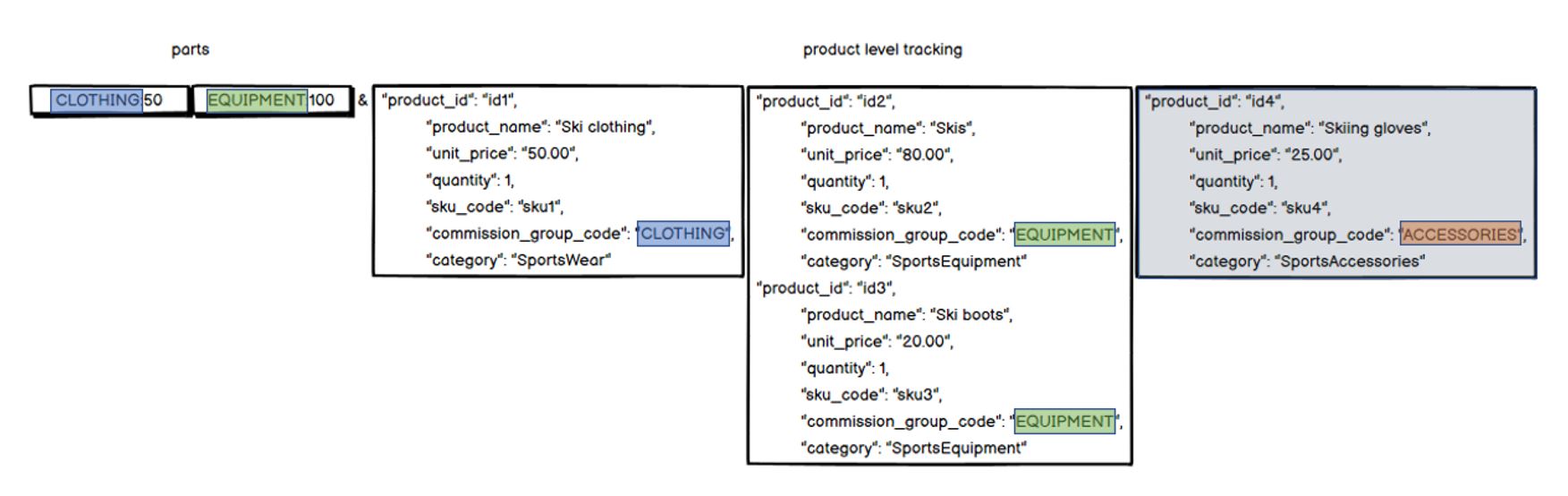
In order to obtain commission based on product ID, product name, or product category, each product in the consumer's basket must be associated to a part in the tracking call. To create a clear link, and to associate products to a part in the tracking call, match the Commission Group code value in the product-level tracking to a tracked part code in the main parts parameter. For example, if you pass CLOTHING and EQUIPMENT in parts, and products related to each one in product level tracking, then the commission group code value in the product-level tracking data must also say CLOTHING or EQUIPMENT.
In the following example, we will be able to match Ski clothing from products to CLOTHING in parts, and Skis and Ski boots from products to EQUIPMENT in parts, and it can be used for commissioning. However, you can see that Skiing gloves in products say ACCESSORIES in the commission group code value and doesn’t have a matching part, so it won’t be mapped to a commission group.
Sale amounts
Sale amounts of products need to match the sale amounts in parts they are associated to. This means that the sum of unit prices multiplied by the quantity of each product needs to match the amount in parts that these products belong to. As a formula, it would look like this:
Part sale amount = unit price * quantity
In the example of multiple products for EQUIPMENT, this would mean that amounts for Skis and Ski boots (80 + 20) need to match the amount in EQUIPMENT parts (100).
However, this may not always be the case. Whenever there are differences in the amounts, we’ll trust the amount in parts, and not in the product level tracking. So if the amount in products is greater than in parts, we will ignore the difference. If the amounts in products is less than in parts, we will create a transaction part for that amount and keep processing the difference and create a transaction part for the total amount.
Commission condition specification
The table below shows the different specifications for the commission by product conditions.
Commission parameter | Value format | Character limit | Value limit |
|---|---|---|---|
Product ID |
| 75 | 250 |
Product Name |
| 100 | 250 |
Product Category |
| 100 | 250 |
Commission flexibility
More information about the options and management of flexible commissions can be found here.