This article covers how you can end a partnership with a partner from your Awin program.
How to end a partnership
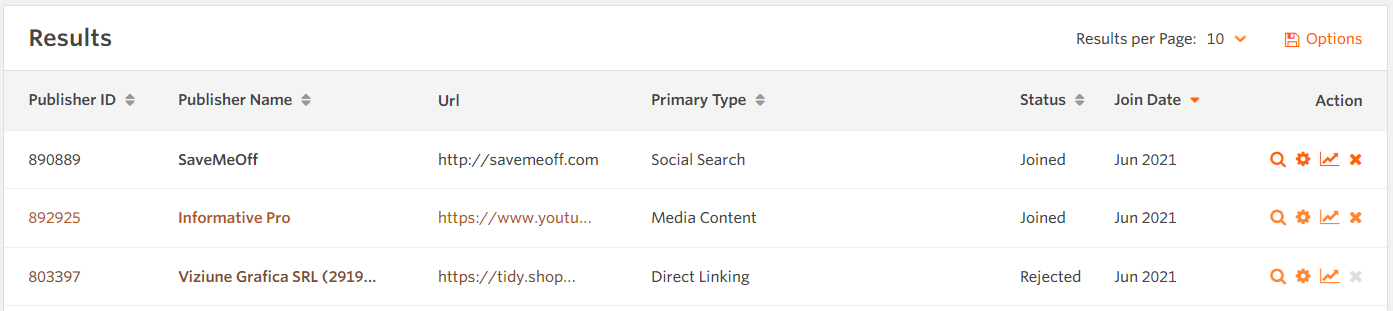
You can end a partnership with any partner from your program through the Publisher Management tool (Publishers > Manage > Publisher Management).
You’ll need to select the X under the Action heading. To help the partner, please give full and clear reasons as to why you want the partnership to end.
Notice period for ending partnerships
The notice period will be stated in your Terms tab in the Profile Overview of your account. As a standard, you’ll have to give your notice at least 7 days before ending the partnership.
You can, however, end a partnership with immediate effect if you have found them to be breaking your program terms. If this has happened, please contact us and provide as much background information as possible on why you want to end this partnership. If you have a dedicated Awin contact, please reach out to them. If not, you can get in touch with our support team by filling out the contact form. We will be able to take action on your behalf, if the terms have been broken.
Bulk-removing partnerships
It’s not possible to remove partners in bulk via the platform, so please contact us. If you have a dedicated Awin contact, please reach out to them. If not, you can get in touch with our support team by filling out the contact form.
What happens after you end partnership
All tracking and linking to your site will stop working after you remove the partner. Any pending transactions will remain and still need to be approved or declined by you.
FAQ
Can Awin end a partnership on my behalf?
Yes, Awin has the right to end partnerships if we suspect the partner is in breach of the advertiser’s program terms, (cl. 14.4.2(b)) of our Publisher Terms.