What is deeplink domain verification
Our deeplink domain verifier is a passive tool that is always on, providing constant protection for users. It checks the domain of Awin deeplinks for malicious content.
In cases where the link is flagged as malicious, the customer will instead be redirected to your default landing page.
How to use the accepted domain deeplinking
Accepted domain deeplink is turned on for new advertisers by default and any existing advertiser can activate this feature.
To activate it:
Navigate in the platform to Account > Settings > Tracking Settings and select the tab Links & Domains.
Enter your accepted domains in the Accepted Domains box.
Tick the checkbox Only allow deep links to accepted domains.
Click Save.
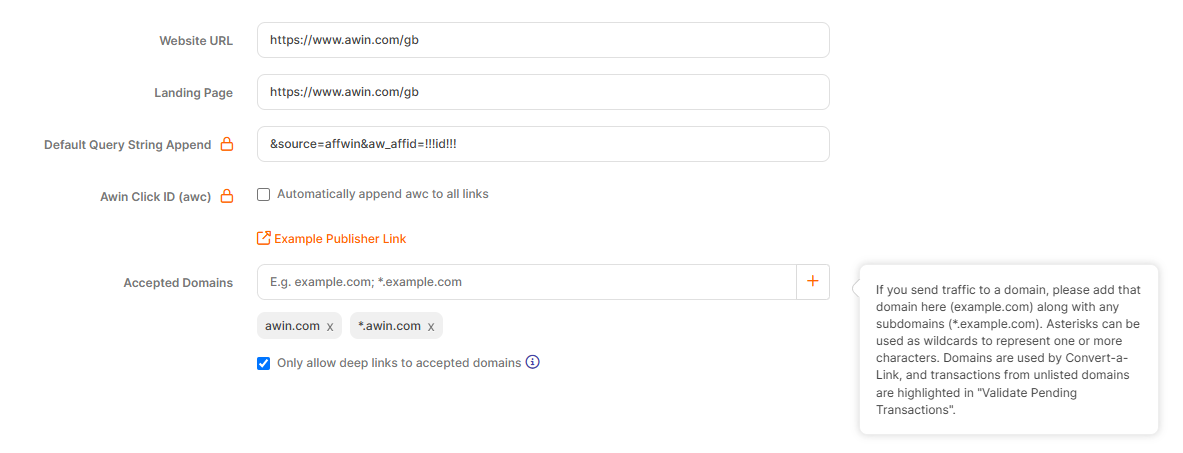
Once done, tracking links containing your advertiser ID will only be able to redirect to one of your accepted domains. If a link is trying to send customers to a domain that is not in the accepted list, they will be redirected to the default landing page.