Platform availability
This article refers to functionality currently available only on Awin Classic.
The article explains Awin’s Conversion Protection Initiative (CPI) and how it ensures accurate conversion tracking.
Tracking is the foundation of affiliate marketing. CPI addresses common challenges in affiliate tracking, such as:
Privacy regulations
The end of third-party cookies
Issues with ad blockers and browser restrictions
Without accurate tracking, your sales may be under-reported, budgets misallocated, and affiliate commissions miscalculated, leading to potential revenue loss and damaged affiliate relationships. CPI ensures your affiliate program tracks conversions accurately and fairly.
What’s required
To be compliant, advertisers need to:
Upgrade to server-to-server (S2S) tracking.
Enable app tracking (if you have an app).
If these updates aren’t made, Awin will use a probabilistic model to estimate the missing conversions.
How does CPI affect you
If you’ve upgraded your tracking
Your conversions are tracked accurately.
You get better insights and precise data.
You ensure correct commission payments to your partners.
If you haven’t upgraded your tracking
Awin’s probabilistic model will estimate your sales, resulting in:
20% uplift for missing app tracking.
12.6% uplift for missing S2S tracking.
Up to 32.6% increase in reported conversions to ensure accurate partner commission distribution.
How to check if you’re compliant with CPI
For S2S tracking - Use Awin’s Tracking Diagnosis Tool. If S2S isn’t listed, you need to upgrade.
For App tracking - Check your Awin profile to confirm if app tracking is enabled.
How to upgrade your tracking
For detailed instructions on tracking installation and troubleshooting, view our tracking guide.
For S2S tracking
Direct integration (for full control) - Use our Tracking Installation Guide for step-by-step instructions on setup and testing or check our technical guide.
Awin’s Conversion API (for bulk tracking) - See our technical documentation for a full guide on integrating with Awin’s API.
Use a tracking technology partner (for quick setup) - Explore our Technology Partner Directory to find pre-approved tracking solutions.
E-commerce store activation (for plug-and-play setup) - For e-commerce shop users, follow our Tracking Diagnosis Tool to test and validate your setup.
For App tracking
Choose a Mobile Measurement Partner (MMP), integrate their SDK with Awin tracking links, and define in-app events.
How to identify probabilistic transactions in reports
Log into the Awin platform.
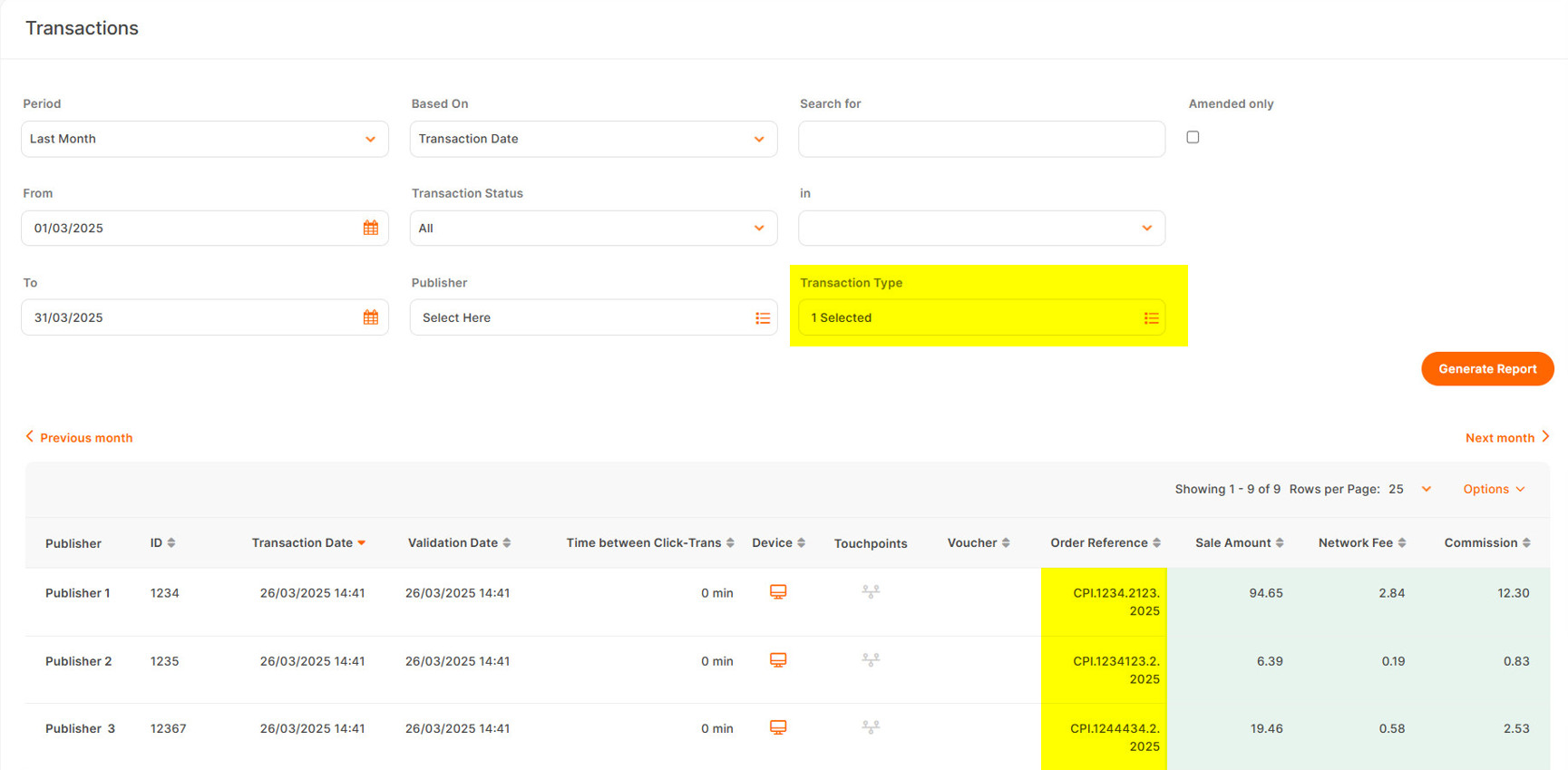
Navigate to Reports > Performance > Transactions and run the report.
Filter by Transaction Type > Probabilistic.
Probabilistic transaction references display as follows:
CPI.AdvertiserID.PublisherID.Date.