What is Proof of Purchase in CLO?
Proof of Purchase enables publishers to submit pending transactions directly to your affiliate program based on verified purchase data. This approach does not rely on click or cookie tracking, making it ideal for card-linked offers (CLO) and other offline or app-based conversions.
What does Activation mean for your Program?
Once activated, approved publishers can post pending transactions via the Publisher Proof of Purchase Transaction API.
These transactions will remain pending until you validate them in the Awin interface or via automated validation rules.
Attribution is based on proof of purchase, ensuring exclusive channel assignment.
How to Activate Publishers in the Awin UI
Log in to your Awin Advertiser Account.
Navigate to: Account → Tracking Settings → Publisher Settings.
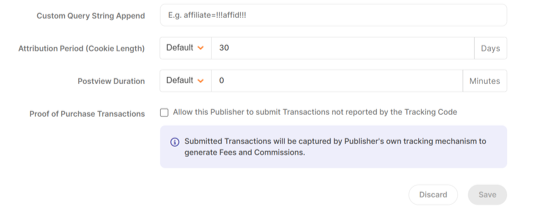
Locate the publisher you want to activate and tick the “Proof of Purchase Transactions” checkbox.
Confirm activation. The publisher will now be able to submit pending transactions via the API.
 Additional Notes
Activation is managed for each publisher, allowing you to choose which partners can access the API.
Publishers are required to follow data standards, which include using the designated order reference format.
It's recommended to request test events from the publisher before switching the API to production.
You can pause or remove access at any time if there are issues, like invalid event format.