This article will help you better understand how pricing works on Awin and how to read your invoices with confidence.
As your program transitioned from ShareASale to Awin, you’ll notice some changes in how platform fees and pricing details are displayed. Don’t worry, your actual costs haven’t changed. We’ve simply updated the way they’re presented to make them easier to understand.
One key improvement: Awin provides detailed invoices that clearly outline all payments and charges processed through the platform.
Prepayment invoices
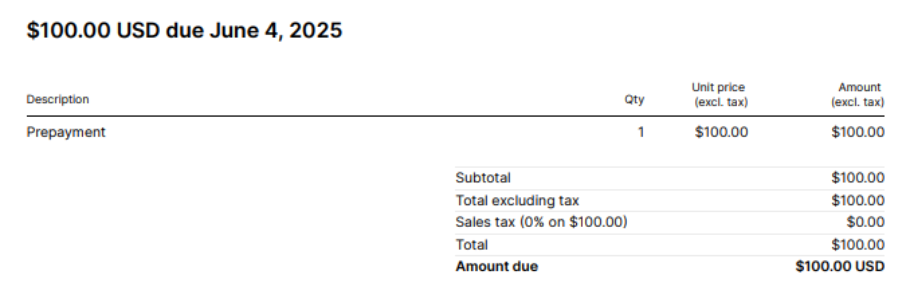
Whenever you make a deposit (whether manually or through auto deposit), you’ll receive a prepayment invoice. Think of it like a receipt: it confirms that your payment was successfully processed.
Example:
Here’s a sample prepayment invoice for a $100 deposit made on 4 June 2025.
First Awin invoice
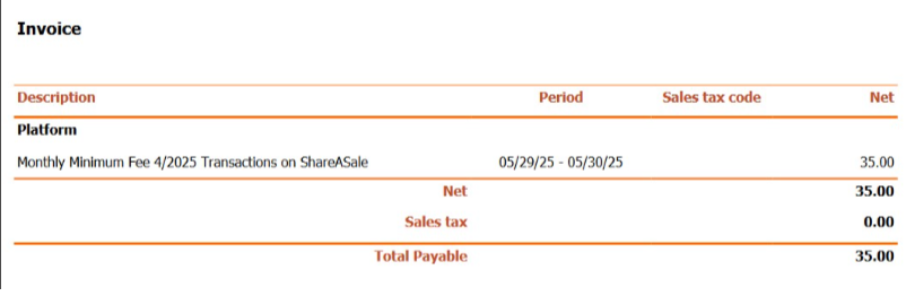
Soon after your upgrade, you’ll receive your first Awin invoice. This will include the full Monthly Minimum Spend amount carried over from your former ShareASale account.
Example:
Below is a first Awin invoice showing a $35 monthly minimum charge for April 2025.
Next Awin invoices with only SAS Monthly Minimum Spend
Going forward, your Awin invoices will reflect the actual costs incurred each month.
One key change: the new Tech Fee line replaces the old ShareASale Monthly Minimum Spend.
Example:
Your Monthly Minimum Spend is $35.
Your tracking fee rate is 20%.
Your program generated $250 of approved commissions and $50 of tracking fee ($250 x 20%).
Here’s how this appears on your invoice:
The first $35 of the $50 Tracking Fee is applied toward your Tech Fee (meeting your monthly minimum).
The remaining $15 is billed as a Network Fee.
.jpg)
Next Awin invoices with only SAS Monthly Platform Fee
If no Monthly Minimum Spend was agreed upon but you were previously paying a Monthly Platform Fee, your Awin invoice will reflect this differently.
Instead of a Tech Fee, you’ll see a line item labeled Accelerate, which represents your Platform Fee.
Example:
Your Platform Fee is $50/month
Your tracking fee rate is 20%
Your program generated $250 of approved commission and $50 of tracking fee ($250 x 20%).
Here’s how this appears on your invoice:
An Accelerate line of $50.
You’ll also see a $50 Network Fee.
This setup mirrors your previous arrangement while clearly separating platform and tracking fee related charges.
Next Awin invoices with SAS Monthly Minimum Spend and SAS Monthly Platform Fee
In some cases, the new Tech Fee line on your Awin invoice will combine both your old Monthly Platform Fee and your ShareASale Monthly Minimum Spend into a single, simplified charge.
Example:
Your Monthly Minimum Spend is $35 and Platform Fee is $50.
Your tracking fee rate is 20%.
Your program generated $250 of approved commission and $50 of tracking fee ($250 x 20%).
Here’s how this appears on your invoice:
A Tech Fee of $85 (combining the former $50 Platform Fee and $35 Minimum Spend).
The $35 portion of the Tech Fee includes the value of your Tracking Fee, up to $35.
The remaining $15 of the Tracking Fee (since $50 – $35 = $15) appears as a Network Fee.
FAQ
Will I pay more after my upgrade?
No, your fees are simply being displayed differently. Your overall costs remain the same.
Does this affect partner commissions?
No, this only affects how your fees to Awin are structured. Partner payments remain unchanged.
Who can I contact with questions?
If you have any questions, please reach out to us. We’re happy to help! If you have a dedicated Awin contact, please reach out to them. If not, you can get in touch with our support team by filling out the contact form.