New Awin and Awin Classic
This article includes features from both the new Awin and Awin Classic. Some features may only be available in one platform.
This article explains how Commission sharing works, how transactions are generated, and where you can find reporting details.
What is Commission sharing
Commission sharing allows Service Partners to work with other partners by applying predefined rules that split the commission earned from sales influenced by the Service Partner’s tools. These rules determine how the commission is divided between the partner and the Service Partner.
How Commission sharing works
When a partner uses a Service Partner tool, any sales influenced by that tool are automatically tracked. The agreed commission sharing rule determines how the commission is split. Both the partner and the Service Partner can view their share through the Commission Sharing tool.
Commission-shared tracking links
Partners use Awin tracking links containing a unique parameter, networkref2, which identifies transactions generated through a Service Partner’s tool. This parameter, provided by the Service Partner, references the commission sharing rule between the partner and the Service Partner.
Example tracking links with networkref2:
http://www.awin1.com/pclick.php?p=4564564&a=45628&m=1001&clickref=widget1&networkref2=cs1_2738

http://www.awin1.com/awclick.php?gid=4766667547&mid=1001&awinaffid=45628&linkid=5756565445&clickref=widget2&networkref2=cs1_2738

http://www.awin1.com/cread.php?awinmid=1001&awinaffid=45628&clickref=facebook&networkref2=cs1_2738&ued=https%3A%2F%2Fwww.exampleadvertiser.com%2F
Generating commission-shared transactions
When a transaction includes a networkref2 value, the associated commission sharing rule is identified, and two transactions are created:
Main transaction: Reflects the commission allocated to the partner and is visible to both the advertiser and the partner.
Bonus transaction: Reflects the commission allocated to the Service Partner and is visible to both the advertiser and the Service Partner.
Calculating commission for commission-shared transactions
The total commission is calculated based on the rates you have agreed with the partner and the Service Partner. The commission is then split between the partner and the Service Partner according to the percentage defined in the commission sharing rule.
Viewing and validating commission-shared transactions
New Awin
Changes you make to transactions (e.g., amend, decline, or validate) automatically apply to the commission sharing split.
Only the main transaction (associated with the partner) requires validation. The bonus transaction (associated with the Service Partner) is updated automatically and doesn’t require further action.
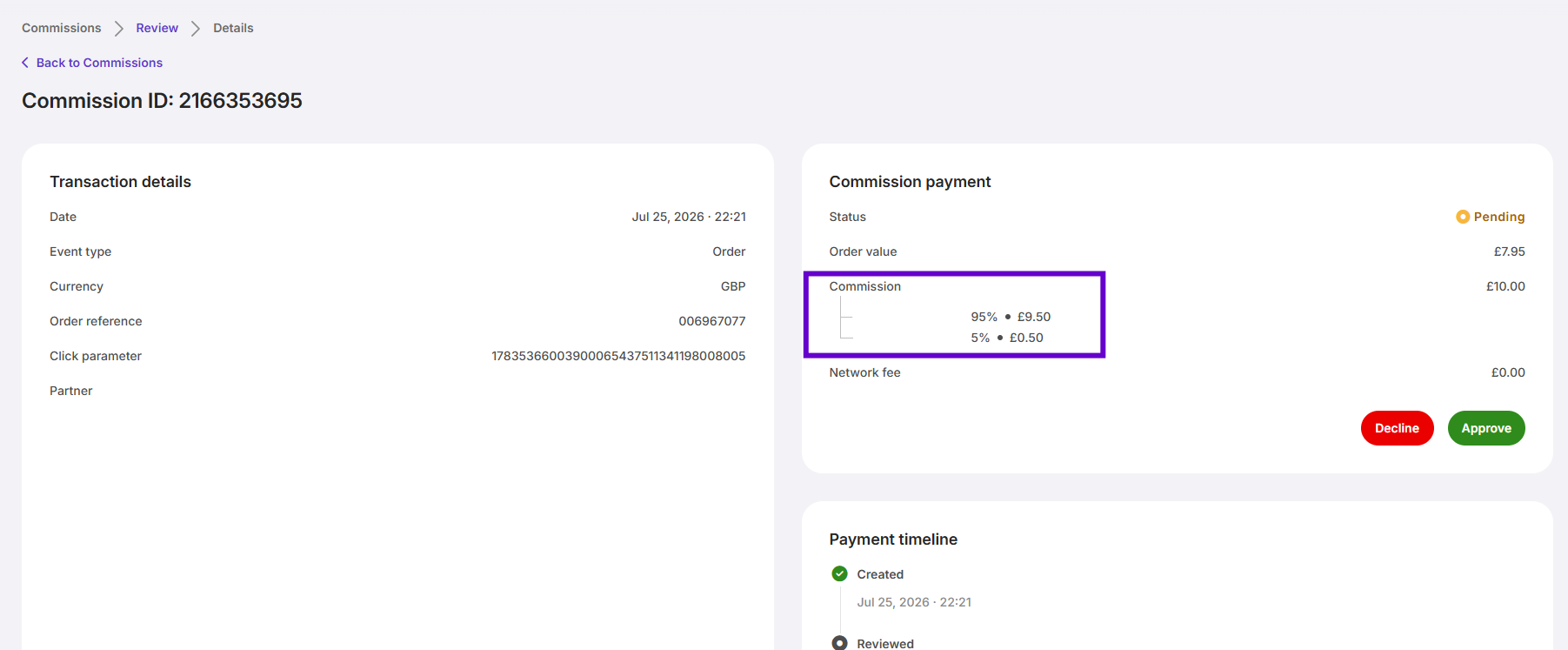
You can find the commission shared payments by going to Commissions > Review and selecting Shared in the Condition filter.
To obtain more information and the respective commission share between the Service Partner and the partner, open Commission details page by clicking on commission ID of the payment that you would like to review.
Exporting shared commission payments
New Awin
You can view and export detailed information about commission-shared payments from the Commissions review page.
Go to Commissions > Review and apply the Condition > Shared filter. Click on Export and choose the option Current table settings. The exported data includes:
Partner name and ID
Service Partner name and ID
Commission share details
Reporting
Awin Classic
You can access detailed information on commission-shared payments through the following reports in the platform:
Publisher Performance
Top Publisher Comparison
Commission Group Performance
Performance Over Time
Device Performance
Transactions
These reports display transactions generated by partners using Service Partner tools as both regular and bonus transactions.
Aggregated reports
In aggregated reports (such as the Publisher Performance report), you will see:
Main transactions recorded for the partner
Bonus transactions recorded for the Service Partner
The Grand Totals in these reports include both main and bonus transactions. Ensure that bonus transactions are excluded from the total transaction count but included in the commission calculations.
FAQ
How does commission sharing work for bonus payments?
Commission sharing applies only to tracked transactions. For bonus payments, you must manually create payments for both the partner and the Service Partner. To find out more about manual commission, refer to this guide.
How are commission-shared transactions reflected in reports?
Commission-shared transactions are shown as regular transactions for the partner and bonus transactions for the Service Partner.
Whose commission template determines the share in commission sharing?
The Service Partner’s commission template determines the share.
Does commission sharing work with advertiser’s offline tracking?
No, commission sharing is not available for advertisers using offline tracking.
What happens if I suspend a Service Partner from my program?
The partnership with that Service Partner ends, and any partners linked through that Service Partner will be removed. However, these partners can reapply to join your program directly.