Platform availability
This article refers to functionality currently available only on Awin Classic.
Plan availability
Commission by Basket Value is available on Access, Accelerate, and Advanced plans.
The Commission by Basket Value tool lets you pay different commission rates depending on the total value of an approved order. This helps you encourage higher average order values (AOV) and set tiered rewards for partners, especially cashback and loyalty ones.
This article explains what the tool does, when to use it, and how to set up basket value rules in the platform.
What Commission by Basket Value does
Commission by Basket Value applies different commission rates based on the tracked order amount. You can create multiple value tiers, each with its own commission rate (percentage or fixed amount). If a transaction doesn’t meet any tier, your default program rate is applied.
You can apply the rule to all commission groups or select specific ones. Partners can only be assigned to one basket value rule at a time
When to use it
Use Commission by Basket Value when you want to:
Increase your AOV by offering higher rewards on larger orders.
Encourage partners, especially cashback or loyalty ones, to promote higher-value purchases.
Create promotional uplift during key periods by applying time-bound tiered commissions.
How to create a Commission by Basket Value rule
To access the tool in the platform navigate to Commission > Rules > Commission by Basket Value.
Click Add New Rule.
Description: Give your rule a description. This can be whatever you like and won’t be visible to partners, e.g., Black Friday promotion.
Commission Group(s): Select the commission groups you want to be associated with the rule. You can either apply the rule to all commission groups (which will include future commission groups you create) or choose Custom to select commission groups manually.
Create the basket value tiers and associated commission (percentage or flat fee). In the below example we have created a rule that offers 3% for orders over £50, 4% for orders between £100 and £150 and 5% for orders over £150:
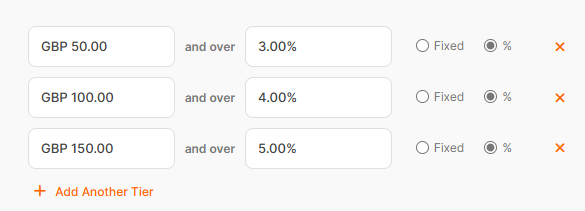
If a transaction came in at under £50 then the default program commission rate would be applied.
The minimum basket value tier is £1 and the minimum rate of commission is 1% or £1.
Select which partner(s) you would like the rule applied to.
Define when you would like the rule to be active. You can select a start and end date, specifying time in 15 minute intervals. Setting an end date is optional. If none is selected then the rule will remain active until you apply an end date and time.
Click Save. The table will refresh and you will be able to see the rule you have created.
You can create as many rules as you like. However, partners can only exist on one rule at a time.
FAQ
Can partners be assigned to more than one Commission by Basket Value rule?
No. Partners can only be enrolled in one Commission by Basket Value rule at a time.
Is there a minimum rate to start a rule?
Yes. Commission tiers must start at a minimum of £1, with commission amounts starting at 1% or £1.
What happens if a sale value doesn’t fall within a set tier?
The default program commission is used when no tier is met.